The MRI simulator that actually builds real clinical skills

When you're learning to scan real patients, you need an MRI simulator where practice translates to real clinical competence.

A laptop displaying Corsmed's MRI simulator interface. The screen shows three images of the brain, in axial, sagittal, and coronal planes, with pulse sequence settings being adjusted in the bottom panel.

Trusted by leading MRI institutions

See the MRI simulator demo

What makes Corsmed different

The only MRI simulator that makes you better at scanning real patients

3 factors determine if simulated training makes you better at scanning real patients.
Icon of MRI brain image with checkmark

1. Image accuracy

Change any parameter on Corsmed, and the image updates exactly as it would on a real scanner, including contrast, resolution, SNR, scan time, CNR, SAR, and artifacts.
1
Parameter icon

2. Parameter coverage

Corsmed lets users practice the full range of clinical scenarios, including sequences, parameters, hardware, patient types, anatomy, pathologies, motion, and slice planning.

MRI console interface icon

3. Workflow similarity

The Corsmed interface mirrors real scanner consoles. Users run protocols, plan slices, adjust parameters, review images, and post-process the same way as on real equipment.

Corsmed is the only simulator that delivers all 3 factors required to learn real MRI scanning.

1 hour on Corsmed = 1 hour on a real scanner.

1. Image accuracy

Every parameter is reflected in the image

Corsmed is the only simulator that creates images from scratch like real scanners, giving you accurate artifacts, contrast, SNR, resolution, CNR, scan time, and SAR.
Run the MRI simulator like
a real scanner

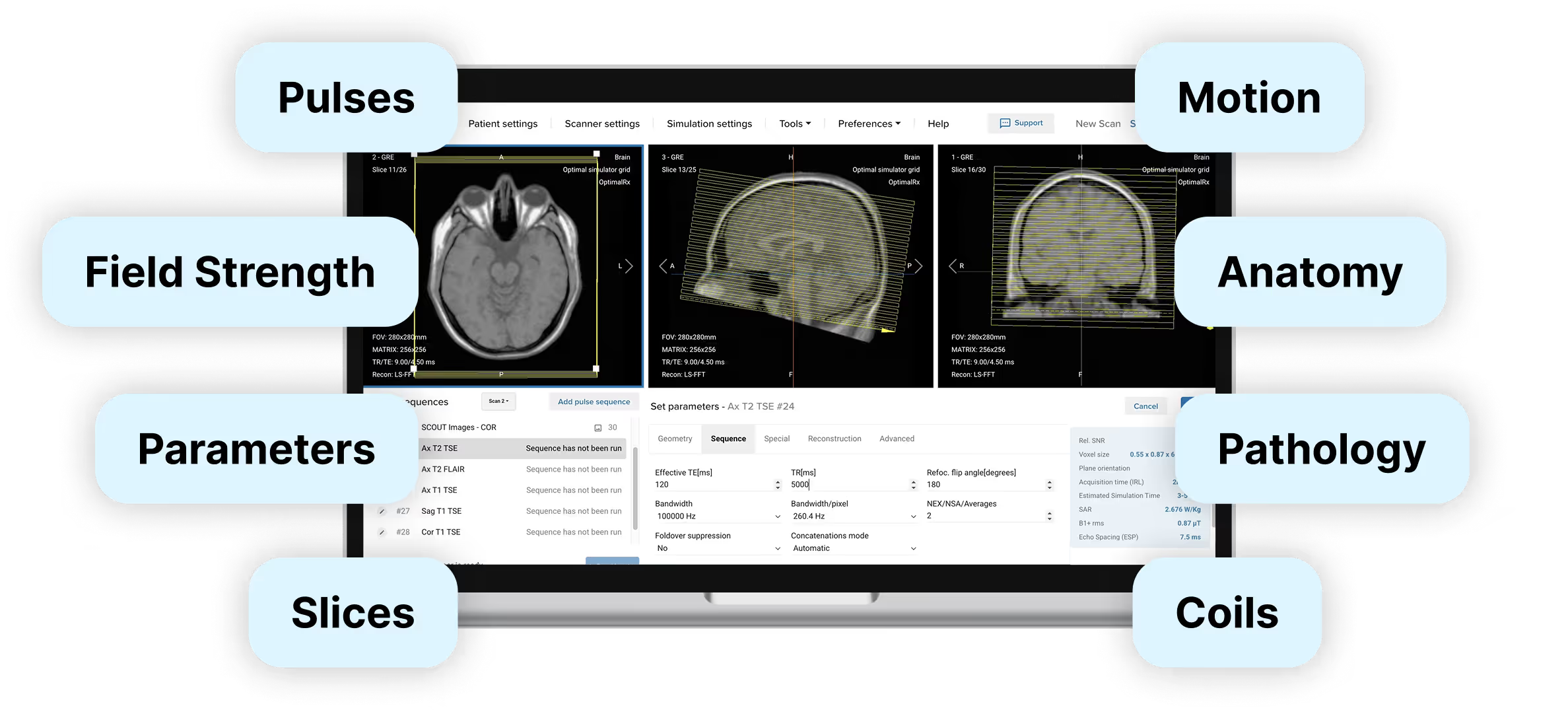
Corsmed's MRI simulator interface surrounded by labeled tags.
Each label represents an adjustable input or setting in Corsmed’s MRI simulator that affects the resulting image.
Left side tags: Pulses, Field Strength, Parameters, Slices.
Right side tags: Motion, Anatomy, Pathology, Coils.
The simulator screen shows axial, sagittal, and coronal planning views.
Curly brace arrow, pointing to the rightCurly braces arrow, pointing down

See what a real scanner
would show

Each label represents a scan output characteristic that is captured by Corsmed's MRI simulator and reflected in the outputted image.
Left side tags: Contrast, Resolution, Scan Time, SNR.
Right side tags: CNR, Artifacts, Anatomy, SAR.

Artifacts are simulated too

Motion
Wrap
Gibbs
Chemical shift
Turbo blurring
Partial volume
Susceptibility
Geometric distortion
Nyquist
Noise
Blooming T2*
Magic angle
Respiratory
Cross-talk

2. Parameter coverage

Simulate nearly every MRI setup

Every body part

  • Head and Neck: Brain, Orbits, Pituitary, IAC/IAM
  • Spine: Cervical, Thoracic, Lumbar, etc.
  • Chest: Cardiac, Lungs, Breasts, etc.
  • Abdomen: Liver, Pancreas, Spleen, Adrenal, etc.
  • Pelvis: Prostate, Uterus, Ovary, Bladder, etc.
  • Upper Extremities: Shoulder, Arm, Hand, etc.
  • Lower Extremities: Hip, Femur, Knee, Foot, etc.
  • Pathologies: Tumors, MS, MI, etc.

25 sequences

  • Spin, Turbo Spin, and Gradient Echo
  • bSSFP
  • CINE
  • DIXON
  • FLAIR
  • EPI
  • Inversion Recoveries

...And many more.

15+ coils

  • Spine coil Rx
  • Cardiac coil Rx
  • Head Birdcage Rx
  • Single Anterior Rx
  • Single Posterior Rx
  • 4x Conformal Rx
  • 8x Conformal Rx

...And many more.

30+ sequence parameters

  • Field-of-View (FOV)
  • Matrix Phase and Read
  • Slice Number, Gap, and Thickness
  • Echo Time (TE)
  • Repetition Time (TR)
  • Turbo Factor

...And many more.

6 field strengths

  • 0.25T
  • 0.31T
  • 0.4T
  • 0.55T
  • 1.5T
  • 3T

See all parameters and settings

Right arrow icon

3. Workflow similarity

Practice just like on real scanners

Corsmed uses a single vendor-neutral interface that mirrors the standard workflows shared by all MRI scanner manufacturers (GE, Siemens, Philips, etc). Patient registry, sequence selection, protocol optimisation, image review; the workflow is the same.

What you learn on Corsmed transfers directly to real scanners.

Real scanner interface

A typical software interface of a real MRI scanner.

Corsmed's simulator interface

Corsmed’s MRI simulator interface. The screen shows three cross-sectional brain scan images being planned in axial, sagittal and coronal planes, and pulse sequence settings being adjusted in the bottom panel.

The simulator also comes bundled with pre-configured protocols across all anatomical regions: neuro, neck, spine, chest, thorax, abdomen, pelvis, lower extremities, and upper extremities.

Who uses Corsmed, and why?

An MRI professor holding a lecture in a classroom full of MRI students
Colleges & Universities
Bridge the theory-practice gap
  • Make abstract physics visual
  • Let students experiment in a safe space
  • Assess skills and track student progress
"Corsmed bridges the gap between classroom learning and clinical practice.
It has 100% helped us ensure our students have the skills to succeed in the real world."
Ray Lee – MRI Program Director at British Columbia Institute of Technology
Ray Lee
MRI Program Director
For education
Back arrow icon
An MRI radiographer / technologist planning an MRI protocol on his scanner console, while a radiology technical aide is helping position the patient in the MRI scanner
Hospitals & Clinics
Train competent staff – without disrupting care
  • Achieve same expertise in 50% of the time
  • Reduce the number of recalled scans
  • Get 3x as much scan practice time
"The simulation-based training has become an essential part of our program.
We would not have achieved the same results without it."
Noyal Mathew – MRI Practice Educator at NHS University College London Hospitals
Noyal Mathew
MRI Practice Educator
For healthcare
Back arrow icon
MRI radiographer / technologist standing confidently in front of an MRI scanner
Students & Radiographers
Build your confidence in MRI scanning
  • Practice without restrictions – 24/7 access
  • See parameter effects in real-time
  • Make mistakes freely in a safe environment
"I did not feel prepared for the clinical setting with only theoretical knowledge.
Corsmed helped me grasp how changing parameters affects SNR, resolution, and scan time."
Profile Icon
Julie P.
MRI Radiographer
For individuals
Back arrow icon

Get started today

Join the institutions and hospitals already practicing with Corsmed.

Frequently asked questions

Does it actually simulate a real MRI scanner accurately?

Yes, and we're the only simulator that does. Most simulators use image libraries: you change a parameter, the image stays the same. Corsmed generates images the same way real scanners do, so every parameter change produces the correct visual effect.

That means students learn real cause-and-effect relationships, not button sequences. What they practice on Corsmed is what they'll see in a real clinic.

Can I use this with no prior MRI experience?

Yes. Many users start with zero MRI experience: students before clinicals, radiographers transitioning from CT/X-ray, or career changers entering the field.

Our MRI Training Bundle includes foundational courses that build your knowledge from the ground up.

Will this actually help me feel more confident scanning?

Yes. That's the entire purpose of Corsmed – to give you the hands-on practice you can't get elsewhere. You'll repeat scans until you understand them, experiment with parameters safely, and practice procedures you've never seen clinically.

The confidence comes from repetition without risk. As one user put it:

"Before clinicals, I was nervous. But Corsmed gave me a better idea of what to expect.

The simulator really helped me understand the trade-offs between SNR, resolution and scan time. Now, I know how to adjust the parameters to create good images in any situation."

How do I know if I'm doing it correctly?

The simulator shows you immediately if your scan works. You see the resulting image quality, contrast, resolution, SAR levels, and scan time as soon as you run the sequence.

What counts as "correct" scan depends on the clinical situation: a T1-weighted brain scan requires different settings than a cardiac cine.

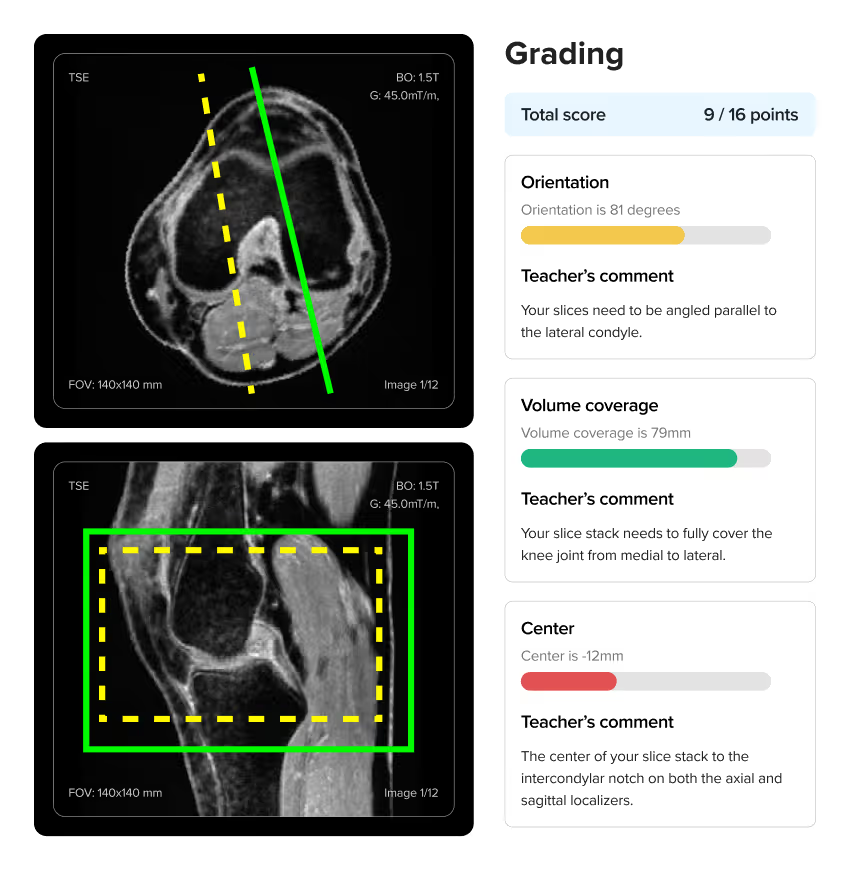
To know if you're scanning correctly, we provide scanning exercises with instant auto-graded feedback. Our course material includes many scan exercises where you're tasked to perform specific types of scans. The auto-grading gives you clear feedback on whether you've achieved the clinical objective, and if not, how you can improve your scan.
For individuals, our MRI bundle includes Doug Boyd's textbook Boyd's Comprehensive Guide to MRI, which also contains reference images showing what correct scans should look like for different protocols.

For organizations, we provide pre-built courses you can deploy immediately. You can also build custom courses and create your own scan assignments tailored to your curriculum. You can create your own scan exercises, or use those the Corsmed team has built.

Does this give me official MRI certification?

No. Corsmed provides training and certificates of completion, but not official registry certification from regulatory bodies like ARRT, ARMRIT, HCPC, or CAMRT.

However, for U.S. and Canada users, ARMRIT allows you to complete 250 of your required 1,000 clinical hours on Corsmed's simulator.

Can I practice on different body parts and pulse sequences?

Yes. The simulator includes a wide range of anatomical models and lets you practice different pulse sequences, orientations, and protocols, just as you would rotate through different exam types in a clinical setting.

You can see a full list of all anatomies, sequences and settings that are available on the Corsmed MRI simulator here: Corsmed MRI Simulator – The complete list of settings

Can I perform cardiac MRI scans?

Yes. The simulator fully supports chest and cardiac MRI, including:

  1. Cine imaging
  2. Myocardial infarction (MI) pathology
  3. ECG-gating
  4. Control over the patient's heart rate and cardiac phase
  5. Playback of the cardiac phase and seeing the heart beating

When you subscribe to the simulator, you also get free access to our Cardiovascular Magnetic Resonance program. This program consists of our four courses that dive into cardiac MRI:

  1. Foundations of CMR (4 learning modules)
  2. Cardiac Morphology and Global Function (5 learning modules)
  3. Tissue Characterisation (4 learning modules)
  4. Blood Flow and Phase Contrast (2 learning modules)

Our MRI Bundle also includes a full cardiac & chest clinical applications course. This is one of the most requested specializations and is included at no extra cost in the bundle.

Can I practice contrast injections?

Yes. The simulator includes dynamic scanning and bolus injection tools. You can perform simulated scans with contrast injections, adjust the amount and timing of the contrast, and also the weight of the patient.

We also have a special bolus injection timing tool, where you can practice injection timing without real-life pressure.

Does it simulate specific scanner brands (GE, Siemens, Philips)?

Corsmed offers a single vendor-neutral interface. This helps you focus on learning the universal MRI principles that apply across all manufacturers, rather than where buttons happen to be located on a specific brand.

Mastery of the fundamentals is what employers most look for when hiring:

"As an MRI educator, I appreciate Corsmed’s vendor-neutral design.

Learners stop focusing on button labels and start grasping the core MRI concepts. That shift has made them far more skilled on every scanner they touch."

Noyal Mathew – MRI Practice Educator at NHS University College London Hospitals
Noyal Mathew
MRI Practice Educator, University College of London Hospitals NHS Trust
How is this different from ScanLabMR?

Corsmed is more accurate and comprehensive. We're built on actual MRI physics equations, not approximations.

When you change inputs on ScanLabMR, you rarely get the same exact image as you'd have gotten on a real scanner.

When you change any input on Corsmed (sequence, parameter, hardware, patient, anatomy, motion, pathology, positioning, or slice angling), you get exactly what you'd see on a real scanner. You see all the effects, including contrast, resolution, SNR, scan time, SAR, CNR, and artifacts.

Artifact management is an especially important part of mastering MRI scanning, and something only Corsmed can simulate accurately. Use wrong slice planning or parameters on Corsmed, and you'll see artifacts just like a real scanner would, including:

  1. Motion ghosting
  2. Wrap (aliasing)
  3. Gibbs
  4. Chemical shift
  5. Noise
  6. Turbo blurring
  7. Partial volume
  8. Susceptibility
  9. Geometric distortion
  10. Nyquist ghosting
  11. Blooming artifact on T2*
  12. Magic angle
  13. Respiratory
  14. Cross-talk

And many more.

With Corsmed, you can trust that you learn real scanning skills.
What you see on the simulator is what you'll see in a real clinic with a real scanner.

Many organizations have switched from ScanLabMR to Corsmed for this reason, including Forsyth Technical Community College and Imperial College Healthcare NHS Trust.

Is it difficult to set up and integrate into our training program?

No, setup is extremely simple. Corsmed works on any computer with an internet connection. There's no software to install, no special hardware to buy, and no IT configuration required. Users just log in and access it through a web browser.

NHS UCLH found that a 1-hour introduction is enough for radiographers to begin practicing independently.

"It's straightforward: press 'Scan' and it scans. Click 'Add protocol' and it adds a protocol.

A 1-hour introduction enables our learners to explore independently. There are good video guides within the 'Help' page too."

Noyal Mathew

Noyal Mathew

MRI Practice Educator, NHS UCLH

Even non-technical users learn to use Corsmed very quickly.

"One of our students wasn't very tech-savvy. She needed IT support just to upload her coursework. But she mastered Corsmed, which shows how user-friendly the simulator is."

Dr. Mahmud Khokhar

Dr. Mahmud Khokhar

MRI Program Director, CNI College

What device and internet speed do I need?

Any laptop 7-10 years old or newer works. The simulator runs in your web browser. You don't need to download or install any software.

A rule of thumb: if your computer can visit the web and email, it's enough to run Corsmed. It can be used on a tablet, but it's not practical on mobile, as the simulator interface requires a larger screen size.

You'll need 1 Mbit/s internet speed (down/up).

Is there a free trial?

Yes. You can sign up and try the MRI simulator for free here:

Try for free
What if I run into technical issues or need help?

You get full support. Every account includes access to our support team, built-in help resources, workflow videos, and guides. You will not have to figure things out on your own.